Types of IRIS Resources
IRIS Resources on the IRIS Resource Locator (IRL)
Developed in collaboration with nationally recognized researchers and education experts, our center’s resources about evidence-based instructional and intervention practices—modules, case studies, activities, and others (including a number of web-based tools)—are created for use in college instruction, professional development activities, and independent learning opportunities for practicing educators. To access these resources, visit the IRIS Resource Locator.
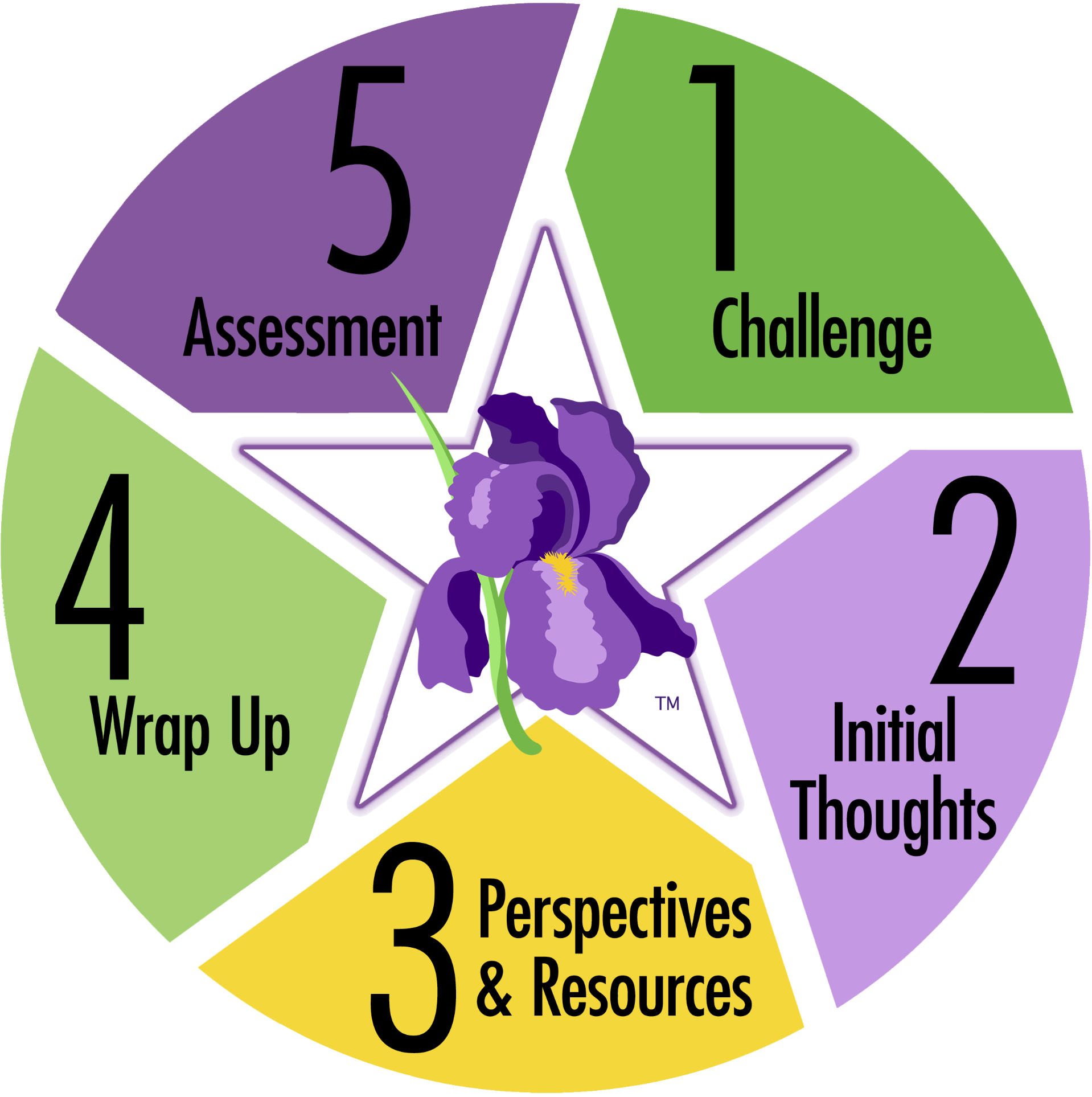 The signature products of the IRIS Center, STAR Legacy Modules offer in-depth looks at topics like high-quality IEPs, student behavior and classroom management, assistive technology, Universal Design for Learning, and many others of importance to educators in today’s classrooms. Our modules offer their content in a variety of formats: text, video demonstrations, audio interviews with experts and practicing educators, and interactive activities. Based on the adult learning theory developed by Dr. John Bransford and his colleagues, IRIS Modules make information on evidence-based practices more accessible and easier to learn than is otherwise possible for many busy educators. Click here to learn more about adult learning theory. Each interactive module is made up of five components:
- Challenge: A realistic scenario relevant to education professionals
- Initial Thoughts: Questions that allow students to explore and consider what they currently know about the scenario presented in the Challenge
- Perspectives & Resources: Nuggets of information (e.g., text, movies, audio interviews, activities) that allow students to actively engage in learning the module’s main content
- Wrap Up: A summary of the information presented in the previous components
- Assessment: An evaluation tool that offers students the opportunity to apply what they know and to evaluate what topics they need to study further
To begin, click on the Challenge at the top of the STAR Legacy cycle. Movement throughout the sections of the module can be managed by making use of the navigation bar at the right side of the page or by following the links at the top or bottom of each page. The IRIS Center recommends that visitors to the website work through the pages of each module in the order presented in the STAR Legacy cycle, starting with the Challenge and moving to Initial Thoughts, Perspectives & Resources, Wrap Up, and Assessment. The center feels that visitors who skip one or more of these sections may not receive the full informational benefit of the cycle. Please note that many module sections contain multiple pages, hyperlinks, short movies, and sound files.
Learn more about how to navigate our modules by watching this short instructional video (time 6:38).

Transcript: Navigating an IRIS Module
In this video, we’ll be learning about the navigation features of the IRIS STAR Legacy Modules, which are based on the adult learning theory research of John Bransford and his colleagues.
Currently, we’re on the IRIS website home page. One way to access a module is to use the IRIS Resource Locator, or IRL. To get there, click on the Resources tab at the top and select IRIS Resource Locator. Using the IRL, you can search for modules in different ways. For example, you can search by topic or you can filter the resource type to show only modules. For each module entry, you will see the title, summary, and estimated completion time.
To access a module, click on the title. This will take you to the module’s landing page, where you’ll again see the module summary and estimated completion time beside the STAR Legacy cycle graphic. Our landing pages require you to choose a pathway—Module Only or Module with PD Certificate—prior to reviewing any content. If you select Module Only, you will work through the module on the open access website that we are currently viewing. With this option, you will not earn a certificate once you have completed the module. For select modules such as this one, we offer certificates of completion. If available, you’ll be able to select the Module with PD Certificate pathway. If you choose this path, you will be directed to set up an account or log in to your existing account. For more information on this path, please visit our “Earning a PD Certificate for Educators” website navigation video.
For the purpose of this video, we are going to select Module Only. This brings you to the Challenge, the first component of the STAR Legacy cycle. Looking at the left navigation bar, you’ll notice the five main module sections that correspond with the STAR Legacy cycle: Challenge, Initial Thoughts, Perspectives & Resources, Wrap Up, and Assessment.
We’ve incorporated some Universal Design for Learning, or UDL, features into the navigation system by giving you multiple ways to navigate through a module. You can explore modules by clicking on the navigation links along the left-hand side or by clicking on the Back and Next buttons at the bottom of the page.
Again, we are on the Challenge page, which includes a video that depicts a typical classroom or school-based scenario followed by a set of questions. Our Challenge videos feature closed-captioning, playback speed, and full-screen options. You can also access the Challenge transcript using the Transcript link. Notice that as you navigate through the module, you can track your progress by looking at the color-coded indicators within the left navigation bar, which you can see change as we move to the Initial Thoughts section.
The Initial Thoughts page reintroduces the questions posed at the end of the Challenge video. Learners can use these questions to reflect on what they already know, or think they know, about the situation.
When you enter the Perspectives & Resources section—which provides the core content of the module—you’ll notice that the landing page contains the learning objectives for the module and the professional standards that the content addresses. Notice that the Initial Thoughts questions appear in the left navigation bar along with the Perspectives & Resources pages that address each question. Now, I’m going to click on the Next button at the bottom of the page to proceed to Page 1.
IRIS Modules contain useful instructional features, such as information that is chunked into bite-size pieces and conveyed through tables and bullets, research highlights, and expert and practitioner interviews. Note that just like the Challenge video, all audio interviews—and video clips—have playback speed options. Because the module content is carefully scaffolded, the pages are meant to be worked through chronologically. Therefore, we do not recommend skipping around.
Now, contradicting what I just said, I am going to use the page-by-page navigation option within the left navigation bar to skip to another page to show you some other module features that users love, such as our videos of teachers implementing strategies with fidelity and our interactive activities with feedback.
After you have finished the Perspectives & Resources section, you can continue to the Wrap Up page. This page summarizes the information from the Perspectives & Resources section and asks learners to reflect on their responses to the Initial Thoughts questions and to consider whether their responses would change now that they’ve completed the module.
Lastly, we have the Assessment page where learners must demonstrate knowledge or skill acquisition. But learners can always return to the Perspectives & Resources section to solidify their understanding of module concepts. If you scroll to the bottom of the Assessment page, you’ll notice that if the module is part of a series, its corresponding module is linked at the bottom of this page. You will also see a congratulatory message that you have completed the module. Next to this, you have the option to provide feedback. We review this feedback weekly to make adjustments to the site and our modules as needed. Note that the feedback survey can be accessed at any point throughout the module using this link at the bottom of the left navigation bar.
Before you go, I want to point out a few more helpful features. You have the option to view all pages in full-screen mode by clicking on the double arrow icon in the top right corner, and if you scroll to the bottom of the page, you’ll notice that you can print each page by clicking on the print icon. You can also save them as PDF documents by clicking here. Because we are constantly tweaking and updating content, we suggest visiting the website for the most current information, rather than referring to older print versions. Additionally, in the bottom right corner of the web page is an accessibility tool, which allows you to adjust accessibility settings. Moving to the top right corner of the website, you will see a Google translation tool, which allows you to translate website content, including modules, into approximately 100 different languages.
This ends our module navigation tour. Thank you for watching this video. We hope you find these resources helpful in your current and future work.
Our multi-part IRIS Case Studies ask users to analyze and respond to a number of problem-based classroom issues and challenges—for example classroom norms and expectations, algebra instruction, or classroom arrangement—through increasing levels of complexity and detail. Case Study Units have several elements:
- STAR Sheets—Each strategy is accompanied by a STrategy And Resource (STAR) Sheet. These contain a description of the strategy, relevant research findings, an explanation of how the strategy is implemented, and references. It is through STAR Sheets that students locate the information they need to answer the assignment questions.
- Case Studies—Each case study presents a problem-based classroom issue or challenge. Designed to accommodate a wide range of student skills, case studies are divided into three progressive levels:
- Level A—Gathering information
Level B—Analyzing information
Level C—Synthesizing information - Case studies contain the following components:
- Background—This contains information about the students.
- Scenario—A Scenario is a description of a hypothetical situation that requires a teacher’s response. In Levels A and B, goals for the target child are provided. At Level C, however, no goals are provided, and identifying goals becomes part of the assignment. In addition, at Level C, areas of strength for the target child are provided to assist in the development of goals.
- Possible Strategies—For Levels A and B, multiple strategies, which are described in the STAR Sheets, are suggested as responses to each scenario.
- Assignment—An assignment accompanies each case study and is appropriate for the case study level. At Level A, assignments allow students to show that they understand the possible strategies for that case. At Level B, students additionally are asked to analyze the information presented in the STAR Sheets. At the most complex level, Level C, students are also required to compare and defend their application of specific strategies.
- Level A—Gathering information
Looking for handy, focused resources for use as independent assignments or to promote classroom discussion? IRIS Course/PD Activities cover a diverse range of topics, including behavior management, language disorders, disability related language in federal law, and many others.
Practical and informative, Fundamental Skill Sheets offer educators quick tutorials about discrete skills and practices indispensable to their role as effective classroom teachers. Fundamental Skill Sheets cover everything from specific praise to proximity control, providing key information in sections like What It Is, What the Research & Resources Say, Steps for Implementation, Tips for Implementation, Implementation Examples (including demonstration videos of both correct and incorrect implementation), Things To Keep in Mind, and References & Resources for further study.
The IRIS Information Brief collection contains: 1) briefs written by IRIS on key topics, designated with the IRIS logo, and 2) online resources developed by other programs and centers, collected and curated by IRIS as supplemental materials. Information briefs provide summaries of topics such as the least restrictive environment (LRE) for students with disabilities, progress monitoring, Universal Design for Learning, and more.
These in-depth discussions with nationally recognized experts or instructors in the field cover a wide variety of topics, including common errors in the IEP process, testing accommodations for students with disabilities, and much more.
These annotations of and links to videos about individuals with disabilities, their families, advocates, teachers, and service providers includes videos about the history of disabilities, as well as depictions of the application of evidence-based practices in educational settings. (Note that some of the videos in this collection might make use of terminology that is no longer current. The inclusion of a video does not necessarily reflect endorsement by the IRIS Center.)
Other IRIS Web-Based Instructional Resources
The IRIS Center produces web-based tools to support and be used in personnel preparation activities. These resources are available under the Resources menu of this website.
Our HLP High-Leverage Practices (HLP) Alignment Tool makes identifying which IRIS Modules and Case Studies align with which HLPs a snap. Developed by the Council for Exceptional Children and the CEEDAR Center, high-leverage practices are 22 essential special education techniques that all teachers of students with disabilities should master for use across a variety of classroom dimensions and circumstances. The tool, which allows IRIS users to search or filter information via a user-friendly interface, also provides links to more detailed information for those who wish to learn more.
Evidence-Based Practice Summaries include annotations of research about the effectiveness of instructional strategies and interventions. This growing collection contains annotations and links to research reports and includes information about an intervention’s level of effectiveness and the age groups for which they are designed.
Curated in conjunction with Mary Anne Prater-Doty, a leading expert in the field today, Books: Portrayals of People with Disabilities contains information and synopses of children’s and young adult literature about or having to do with people with disabilities. This information includes the name of the author and illustrator, year of publication, publisher, appropriate grade level, and award status.
Our search tool Films: Portrayals of People with Disabilities represents an attempt to catalogue the representation of people with disabilities in motion pictures. Many of those representations are inaccurate, and some are offensive. Their inclusion in this tool is intended to stimulate discussion and should by no means be considered an endorsement of their accuracy or appropriateness.
IRIS Resources To Support Coursework
IRIS has developed many tools and materials specifically to facilitate the incorporation of information about evidence-based practices into personnel preparation. These resources, located in the Using IRIS section of our website.
Coursework Planning Forms, also found under For Faculty, are designed to help faculty as they revise either their individual courses or overall curricula for the initial preparation of education professionals.
Tips for Using IRIS Resources, found in the For Faculty section under Using IRIS, contains a wealth of suggestions about how IRIS Modules can be integrated into professional development activities.
